Web + offline software for optical shops

Optical shop software for India, on the web and offline.

Optical Mart is software for Indian optical shops: GST billing, customers and refractions, lab orders, stock and barcodes, appointments, payments and follow-up, with the profit on every bill for the owner. Use it in any browser, and install the offline desktop app on the counter so billing carries on through an internet outage. One account, one set of records. What the counter does offline reaches the website when the line returns.

Updated 21 November 2026 Refreshes 5 December 2026 4 min read

Short answer

Optical Mart is optical shop software for India: GST billing, eye tests, lab orders, frame and lens stock, payments and customer follow-up, in any browser and in a free-to-download offline app for Windows that keeps billing without internet. Every plan starts with one month free, no card; then from Rs. 599 a month plus taxes.
  • GST bills with GSTIN, HSN/SAC, CGST and SGST, on A4 or an 80 mm receipt
  • The offline Windows app bills for up to three days without internet and syncs when the line returns
  • Lab jobs tracked from booking to delivery against a promised date
  • Profit on every bill, calls to make and a 6 AM summary email for the owner
  • One month free, then Basic Rs. 599, Standard Rs. 899 or Hospital Rs. 1,599 a month, plus taxes
  • Also for shops abroad: their own currency, VAT or sales tax and tax number

See the software

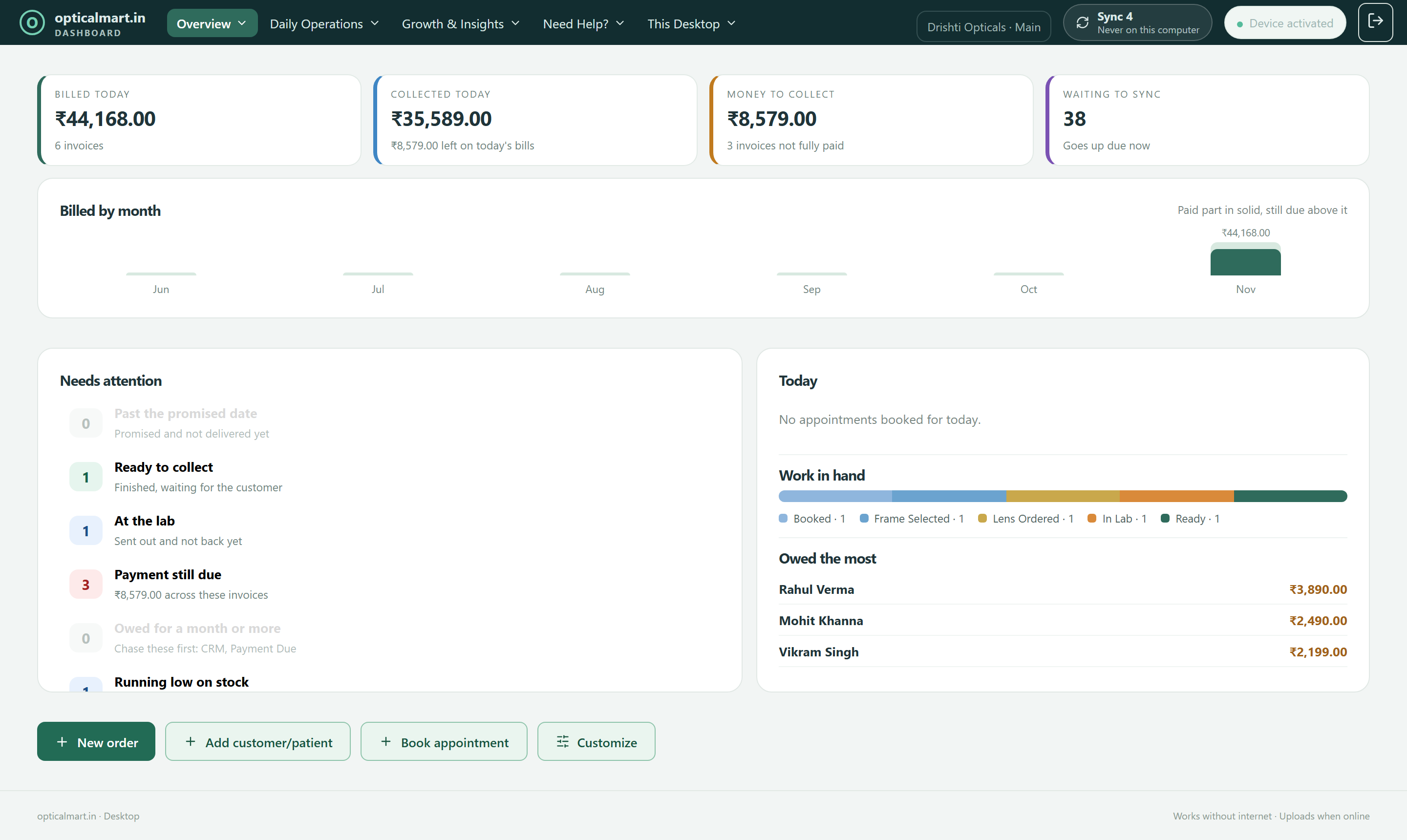
The Optical Mart dashboard showing today's billing, collections, money to collect, jobs needing attention and customers who owe the most
Dashboard. The day at a glance: billed and collected today, money still to collect, and the jobs that need attention.
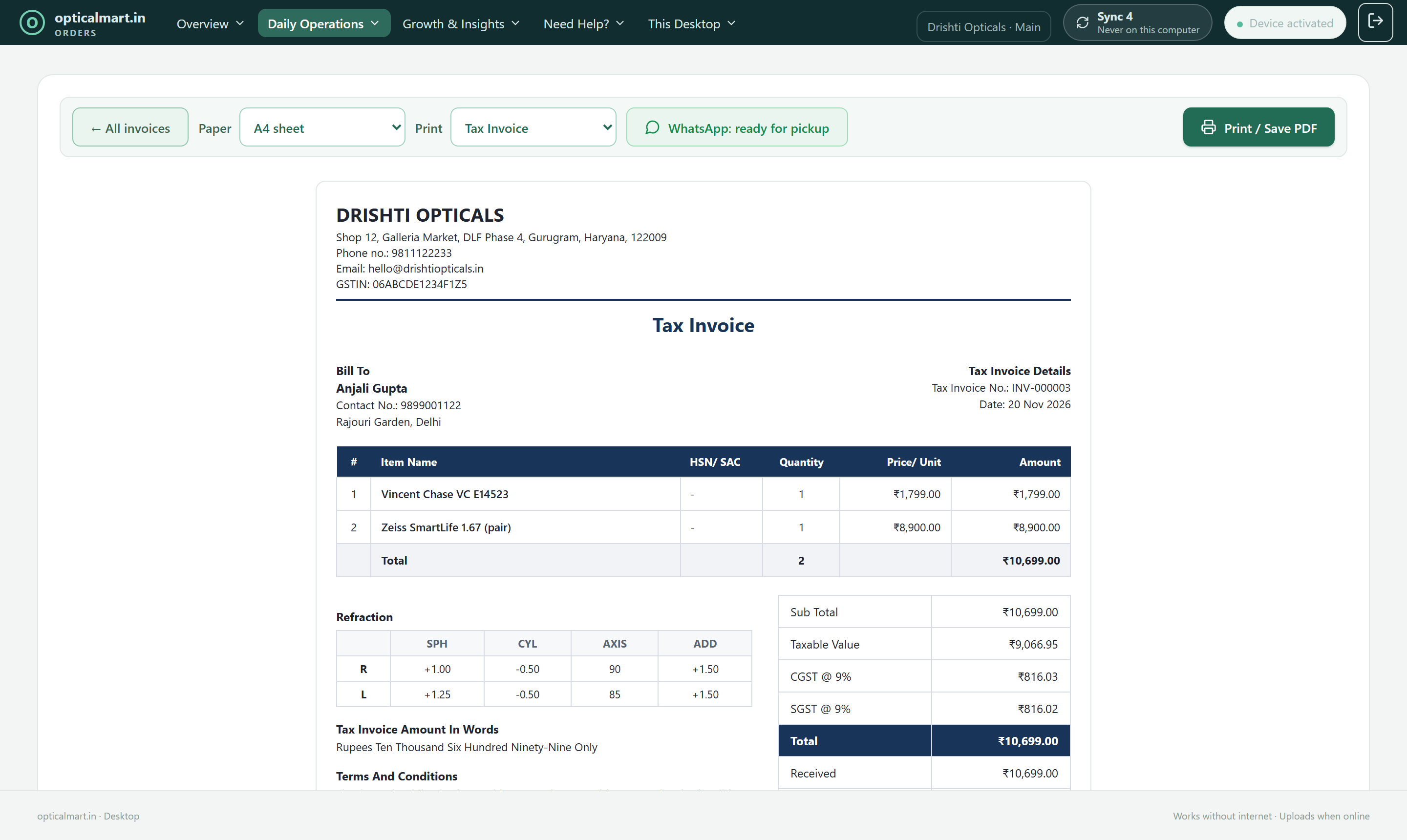
A GST tax invoice for an optical shop with the customer's eye powers, HSN codes and CGST and SGST totals
GST bill. A GST bill with GSTIN, HSN/SAC, CGST and SGST and the customer's eye powers, on A4 or an 80 mm receipt.
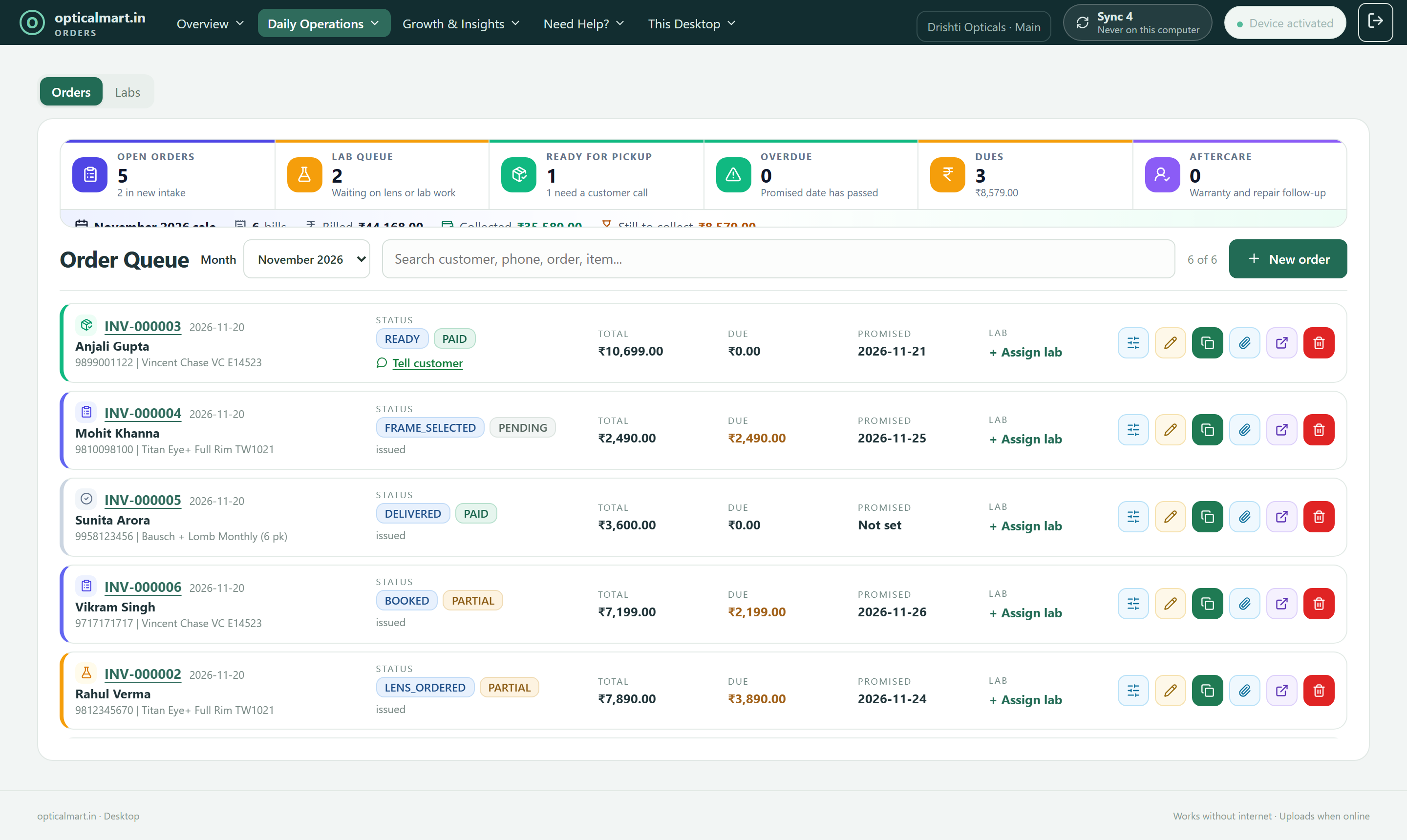
The optical order queue with open orders, lab queue, ready for pickup, overdue and dues, and each job's stage, total, due amount and promised date
Order queue. Every job from booking to delivery, with its stage, promised date and what is still due.
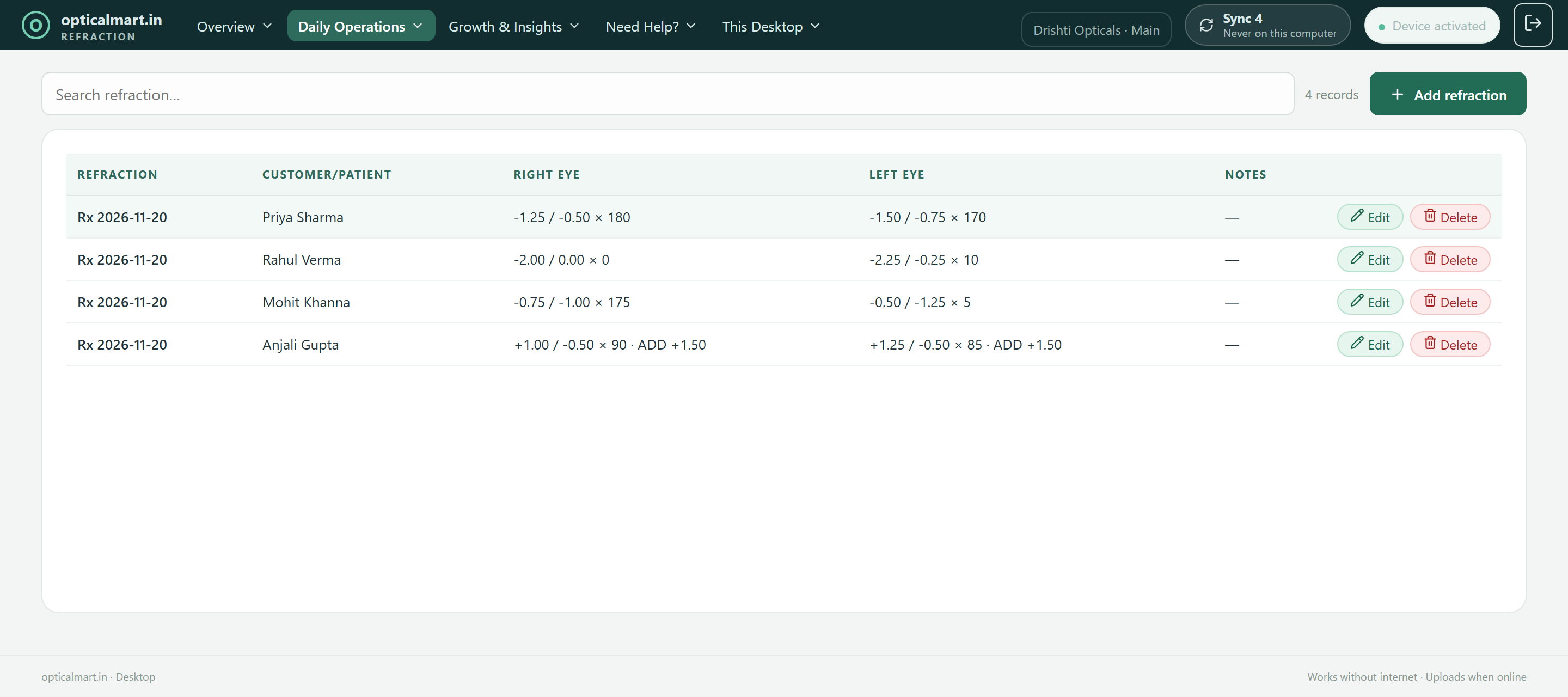
A list of refractions with SPH, CYL, AXIS and ADD for the right and left eye of each customer
Eye tests. Refractions kept with the customer: SPH, CYL, AXIS and ADD for both eyes.
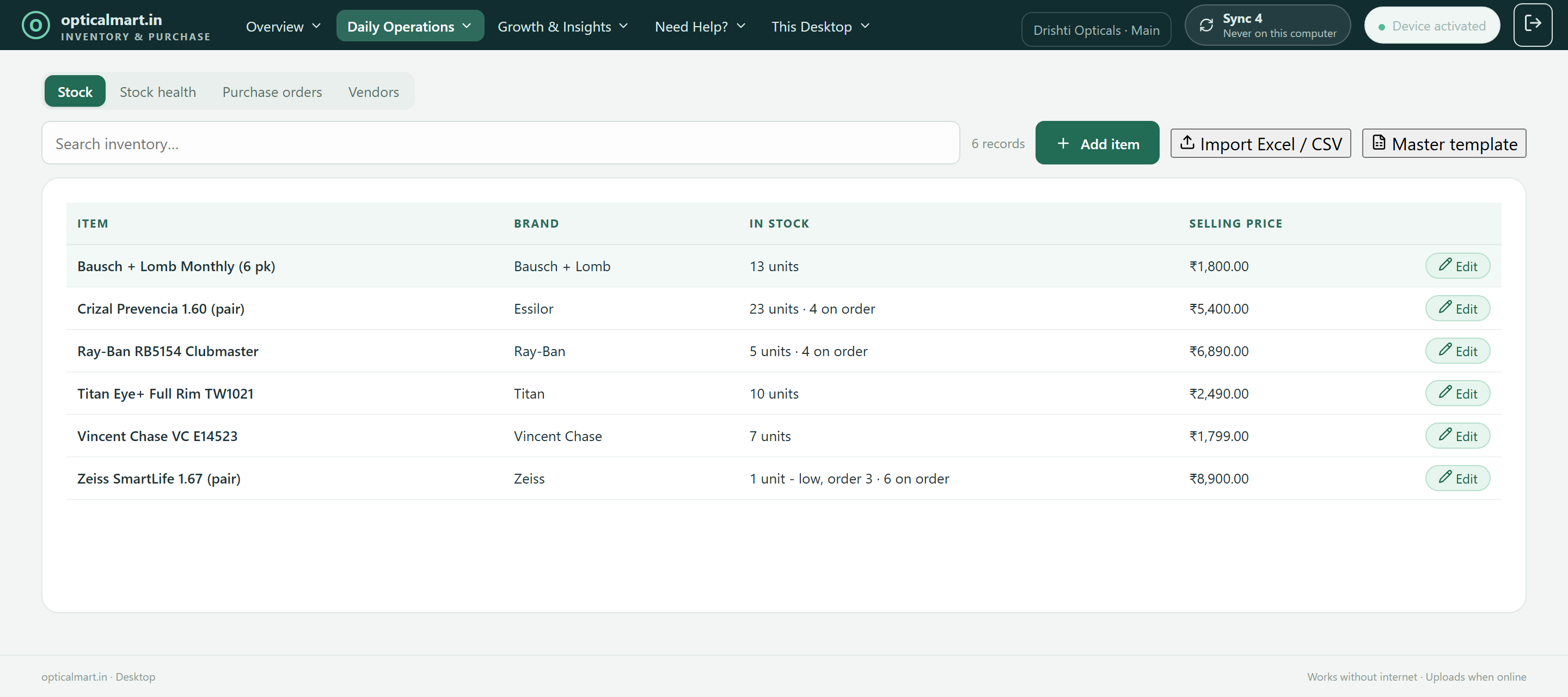
Optical inventory of frames, lenses and contact lenses with brands, units in stock and selling prices
Stock. Frames, lenses and contact lenses with cost, price and a low-stock warning.
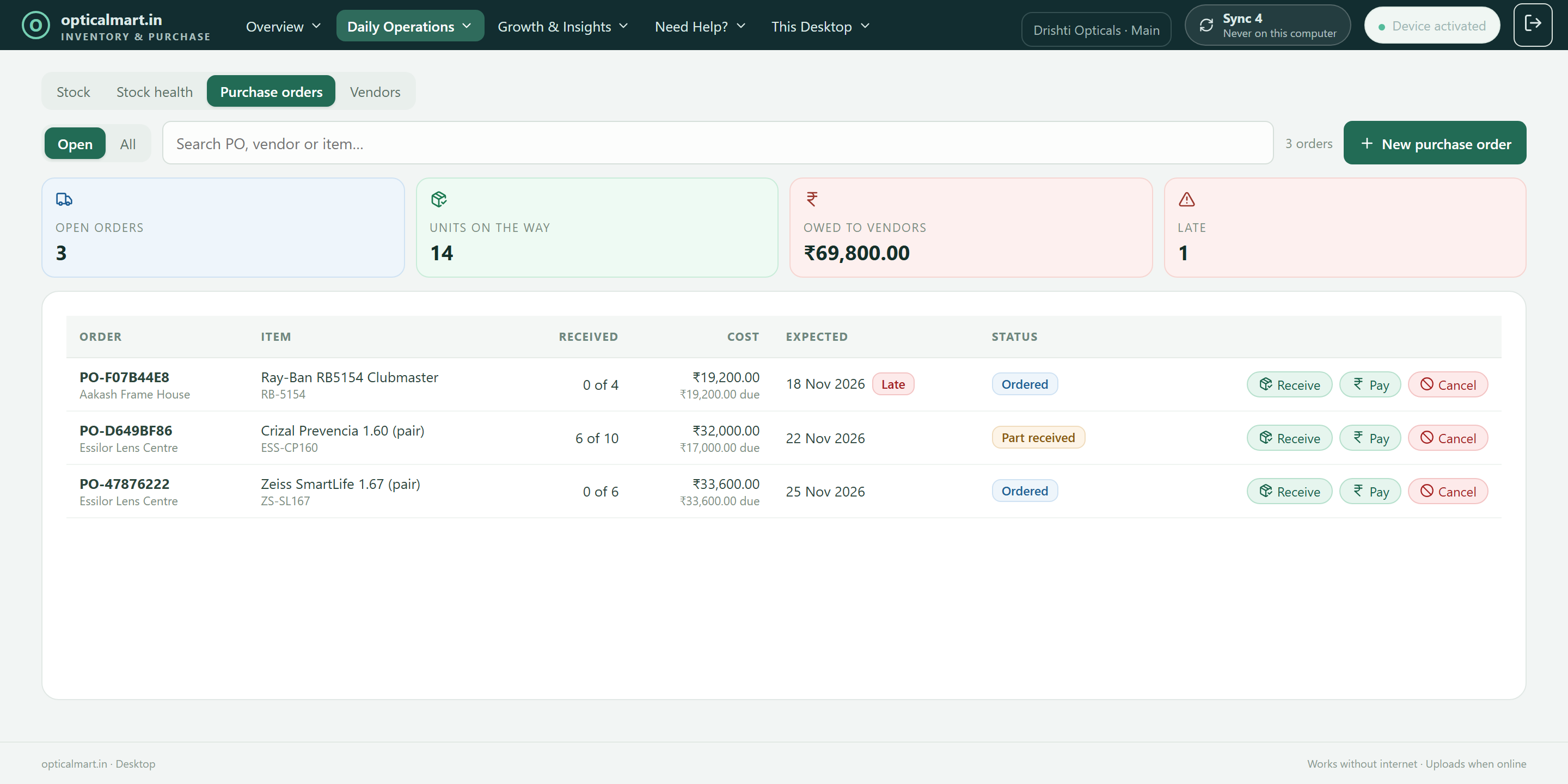
Purchase orders to optical lens and frame suppliers with ordered, received and paid amounts
Purchases. Purchase orders to lens and frame suppliers: ordered, received and paid.
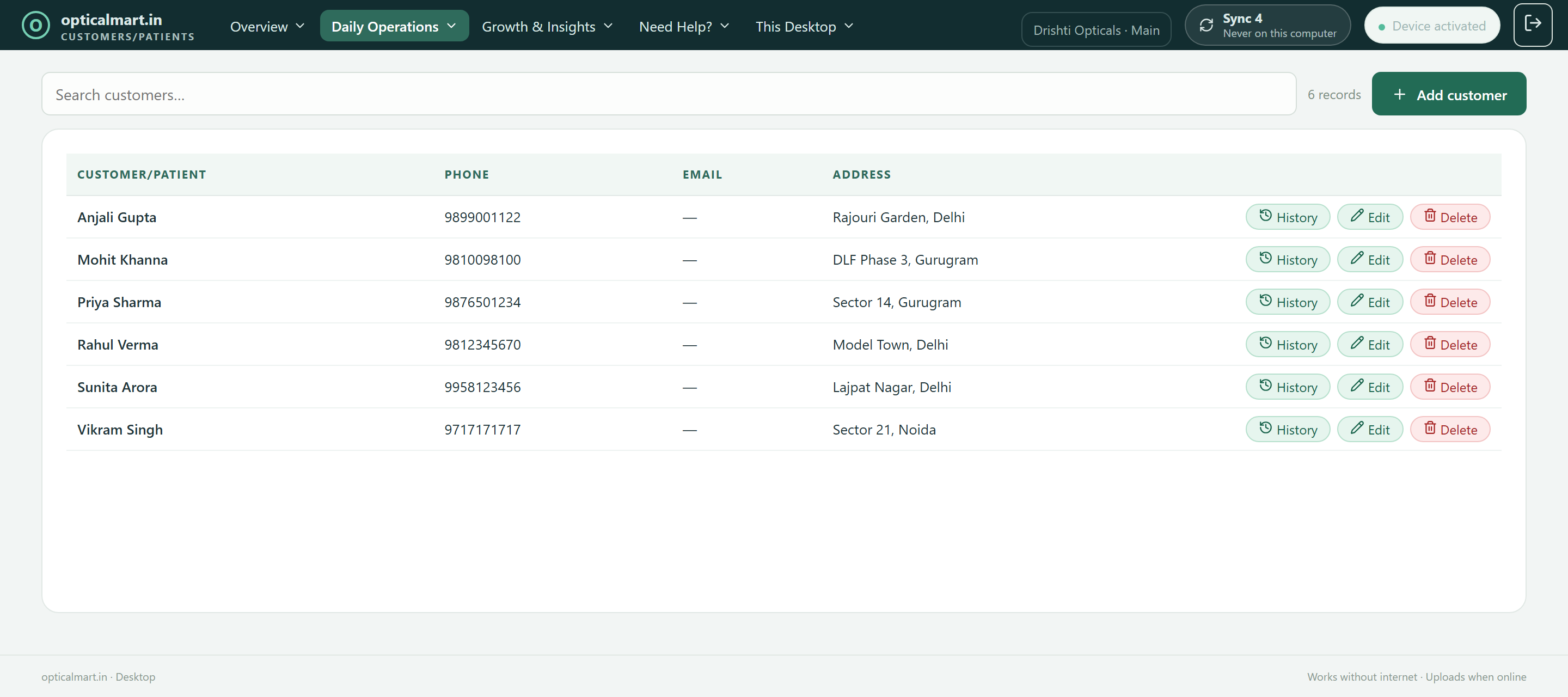
The customer and patient list of an optical shop with names, phone numbers and addresses
Customers. Every customer one search away, with their eye tests, orders and dues.

Optical Mart is software for Indian optical shops: GST billing, customers and refractions, lab orders, stock and barcodes, appointments, payments and follow-up, with the profit on every bill for the owner. Use it in any browser, and install the offline desktop app on the counter so billing carries on through an internet outage. One account, one set of records. What the counter does offline reaches the website when the line returns.

Added in October and November 2026

What shipped lately to help a shop collect its money, earn reviews and keep its stock right.

  • Profit on every bill (Web app): See what each bill earned after the cost of the frame and lenses - on the order, on the dashboard and in your 6 AM email. Only the owner sees it.
  • Calls to make (Web app): The biggest balances to collect and the customers due for their yearly eye test, in one list you can tap to call.
  • Google review QR on bills (Web app): Add your Google review link once; every bill prints a 'Scan to rate us on Google' QR for the happy customer holding it.
  • Stock that adds up (Web app): A stock ledger, stock counts, a SPH x CYL power grid for lenses, contact lens expiry, and vendor returns with a debit note.
  • 6 AM summary email (Email): Yesterday's billing, collections, profit and dues in your inbox before the shop opens.
  • Online booking (Web, reaches the counter on sync): Customers book an eye test from your shop page into your calendar, with your hours and no double booking.

Web app and offline desktop app

Both come with every plan and work on the same records. The web app runs in any browser on Windows, Mac, Linux, Android, iPhone and iPad. The offline desktop app installs on Windows 10 and 11, keeps billing for up to three days with no internet, and uploads everything in order when the line returns.

The offline app is a free download from opticalmart.in/download/desktop; sign in once with the shop owner's account.

  • The counter works offline: Every bill, payment, refraction and appointment is saved on the counter computer, encrypted, and queued. It keeps billing for up to three days without the internet.
  • The line comes back: The queue uploads in order, every hour and the moment the internet returns. Nothing is posted twice, even if the upload is retried.
  • The website is current: The owner sees the counter's sales in the browser, and changes made on the website come down to the counter.
  • A new counter sets itself up: Install the app on another computer and sign in once: the shop's records come down by themselves. If a computer breaks, its replacement can take over work that had not been uploaded.

Every feature, and where it works

Web means in the browser; offline means on the counter app with no internet.

  • GST billing and invoices (web and offline): Bills with GSTIN, HSN/SAC codes, CGST and SGST, printed on A4 or a receipt roll.
  • Customers and refractions (web and offline): Customer records, eye powers checked in 0.25 steps, duplicate readings caught.
  • Orders and lab tracking (web and offline): Eight job stages from booking to delivery, lab name, job number and promised date.
  • Lab jobs, lens check and remakes (web, partly offline): A lab job sheet with QR, the power in minus cylinder, lens and frame details, the lab's own status page, a lens check to ANSI Z80.1 tolerances, remakes, lab scorecard and lab accounts.
  • Optical calculators (web and offline): Transposition between plus and minus cylinder, spherical equivalent, contact lens power with vertex distance, and reading power - with the working shown.
  • Offers and coupon codes (web and offline): The owner sets the discounts - % or flat, dates, categories, caps and limits - and staff apply them by code instead of giving their own.
  • Payments, dues and returns (web and offline): Part payments, reversals, returning part of a bill, and a shop cash book.
  • Stock, barcode and QR labels (web and offline): Frames and lenses, stock movements with reasons, low-stock floor, and Code 128, EAN-13 or QR labels on sheets, rolls and frame tags.
  • Appointments and walk-ins (web and offline): Eye tests, follow-ups, deliveries, and a numbered walk-in queue.
  • Dashboard and reports (web and offline): Billed and collected today, dues, overdue jobs and monthly sales for the whole branch.
  • Customer follow-up lists (web and offline): Who to call today - payment due, ready for pickup, no-shows - with the words to send, and each customer's full history.
  • AI assistant (web and offline): Ask about your own shop's numbers in plain words.
  • WhatsApp campaigns and reminders (web, partly offline): Approved templates, appointment reminders and campaigns.
  • Staff logins and roles (web): Multiple users with roles on Standard and Hospital plans.
  • Branches and stock transfers (web): Branch-wise records and transfers between branches.
  • Vendors and purchase orders (web and offline): Suppliers, purchase orders, receiving stock and paying suppliers.
  • Invoice share links (web): Send a customer their bill or prescription as a secure link.
  • Shop page and digital card (web, partly offline): Your shop's own web page with your collection, a digital visiting card and a QR code - found on Google, shared on WhatsApp. Phone numbers show in your country's own style, such as +91 98733 21199 or +389 75 202 444.
  • GST return in Excel (web and offline): The month's GSTR-1 tables - b2b, b2cs, HSN and documents - as one workbook for your CA.
  • Shops outside India (web and offline): Bills in your own currency with your country's VAT, GST or sales tax, your tax number on the invoice, tax added on top of prices counted in what is owed, and a monthly tax summary - on the web and on the offline counter.
  • Invoice formats for shops abroad (web and offline): Your own invoice format, paper (A4, A5 or an 80 mm roll, as the format allows) and label language - English, Macedonian or Albanian - with your logo, a discount shown as regular price, what came off and the final price, and an A5 job card with a tear-off customer copy. Set up with our team; the counter prints the same PDF as the website.
  • Online booking and visit calendar (web, partly offline): Customers book a visit from your shop page - a service, a day, a free time, a name and a number - straight into your appointments, with no double booking. Set the week you take visits, special dates (closed, or a half day) and how long a visit takes; a two-week calendar in half-hour slots shows who is coming.
  • Bulk stock import (web and offline): Bring frames and lenses in from Excel or CSV with the master template, on the web or at the counter with no internet. Items already in stock (same SKU) are skipped, or updated from the file if you choose; items with no opening stock and preferred vendors come in too.
  • Offline counter sync (web and offline): Every bill, payment and change is saved on the counter computer, encrypted, and uploaded in order every hour and the moment the internet returns - nothing is posted twice. The website's changes come down to the counter, and a new counter brings the shop's records down by itself.
  • Profit on every bill (web): The owner sees what each bill earned - price less what the frame and lenses cost - on the order, in a Profit tile on the dashboard and in the 6 AM email. Lenses made to order use your usual cost %, marked as an estimate. Staff never see it.
  • Calls to make (web): Two short lists on the dashboard: the biggest balances to collect and customers whose yearly eye test is due. Tap to call; a customer marked Called rests for two weeks.
  • Google review QR on bills (web): Add your Google review link once and every bill prints a 'Scan to rate us on Google' QR, in India and abroad.
  • Stock ledger, counts and lens power grid (web): Every stock change in a ledger, stock counts with corrections, a SPH x CYL power grid for lenses, lot and expiry for contact lenses, returns to a vendor with a debit note, and owner approval for staff stock changes.
  • Morning summary email (web): At 6 AM each day the owner gets yesterday's billing, collections, profit and dues by email, in the shop's own currency.
  • AI bill scan (add-on) (web): Photograph or upload a supplier's bill and the purchase bill fills itself in, with AI notes on slow stock and what to reorder. A paid add-on, up to 300 scans a month.
  • Locked counter, several accounts (offline app only): The counter opens with your PIN and keeps its records encrypted on the computer. A recovery code can be emailed to yourself - it opens your mail app, and nothing passes through our servers. Several OpticalMart accounts can share one computer, each with its own PIN and records.

From sign-up to first bill

  • Register your shop: Create an account with your shop name, GST details and phone. The first month is free, with no card.
  • Add stock and customers: Enter frames and lenses once. Customers and refractions are added as they walk in.
  • Bill on the web or the counter: Use any browser, or install the offline desktop app on the counter computer and sign in once.
  • Stay in sync: The desktop uploads its work every hour and whenever the internet comes back, so the website always has the day's sales.

Plans and prices

Every plan includes the web app and the offline desktop app. Prices are per month, plus taxes; yearly billing saves 5%.

  • Free Trial: Free for 1 month. For a store that wants to run a full month on real billing before paying anything.
  • Basic: Rs. 599/month. For a single-counter store that wants full billing on the web and offline.
  • Standard: Rs. 899/month. For stores with staff, where more than one person needs to be logged in.
  • Hospital: Rs. 1,599/month. For eye hospitals and chains that need clinical workflows, a guided rollout and custom requests.

Related pages in this topic cluster

Optical Software Features | Optical Mart

Every Optical Mart feature and where it works - in the browser, on the offline counter app, or both: billing, refractions, lab jobs, stock, profit, follow-up and more.

Optical Software Pricing | Optical Mart

One month free, then Basic Rs. 599, Standard Rs. 899 or Hospital Rs. 1,599 a month plus taxes. Every plan includes the web app and the offline desktop app.

Optical Software Solutions | Optical Mart

Feature-focused landing pages for billing, inventory, CRM, prescriptions, orders, appointments, and marketing. See how Optical Mart supports every workflow optical stores care about.

Frequently asked questions

Does Optical Mart work without internet?

Yes, with the offline desktop app for Windows. It bills, takes payments, books appointments and prints labels with no internet for up to three days, then uploads everything when the line returns.

Is there free optical shop software in India?

Optical Mart is free for your first month, with no card needed, so you can run real billing, customers, refractions and orders before paying. After that the plans are Basic at Rs. 599, Standard at Rs. 899 and Hospital at Rs. 1,599 a month, plus taxes. If you do not continue, your data stays yours.

Can I download optical shop software for free?

Yes. The Optical Mart offline desktop app for Windows 10 and 11 is a free download from opticalmart.in/download/desktop, and every plan starts with one month free with no card. Sign in once with your shop's account and the counter bills with or without internet. After the free month Basic is Rs. 599 a month plus taxes; on a Mac, Linux or a phone, use the web app in the browser.

How does the offline app sync with the website?

Everything the counter does offline is saved encrypted on that computer and queued. The queue uploads in order every hour and the moment the internet returns, and nothing is posted twice. The website's changes come down to the counter, and a new counter brings the shop's records down by itself when you sign in.

Which devices does it work on?

The web app works in any up-to-date browser on Windows, Mac and Linux computers, Android phones, and iPhone and iPad. The offline desktop app installs on Windows 10 and 11 (64-bit); on a Mac or Linux computer, use the web app.

What does it cost?

Every shop starts with one month free. After that Basic is Rs. 599 a month for one user, Standard Rs. 899 for multiple users, and Hospital Rs. 1,599 with custom requests - all plus taxes. Yearly billing saves 5%. Automatic WhatsApp messages are charged separately at Meta's per-message rates, plus taxes.

Are the bills GST compliant?

Bills carry your GSTIN, HSN/SAC codes and the CGST and SGST worked out of the price, on A4 or an 80 mm receipt.

Is my data safe if a computer breaks?

Everything synced is kept in your online account. The desktop app also keeps a daily encrypted backup on the computer and in the cloud, and a replacement computer can take over work that had not been uploaded.

Does it handle lab jobs and remakes?

Yes. Each order's lab job carries the lens, frame and fitting details and prints a job sheet with a QR. The lab can update the job from its own link, the shop scans it back in, checks the lenses against ANSI Z80.1 tolerances and records a remake with who pays.

Can I see the profit on each bill?

Yes, on the web app. The owner sees what every bill earned - the price less what the frame, lenses and other items cost - on the order, in a Profit tile on the dashboard and in the 6 AM summary email. Lenses made to order can use your usual cost as a percentage, shown as an estimate. Staff never see profit.

Can it help my shop get more Google reviews?

Yes. Add your shop's Google review link in Settings once, and every bill prints a 'Scan to rate us on Google' QR code, so a happy customer can leave a review from the bill in their hand.

Does it track contact lens expiry and stock counts?

Yes, on the web app. Contact lenses and solutions carry a lot and expiry (oldest sold first, alerts before expiry, write-off), stock counts post their corrections to a stock ledger, lenses can be added in every power from a SPH x CYL grid, and stock can go back to a vendor with a debit note.

Can staff give discounts?

Yes, using a discount coupon. The owner sets coupon codes with dates, categories, caps and usage limits; staff apply a code, and the database refuses a discount a staff member types on their own.

Can a shop outside India use it?

Yes, on the web and on the offline desktop app (from version 0.5.22). Bills are in your currency with your country's VAT, GST or sales tax and your tax number, and you get a monthly tax summary.

Can my staff use it?

Yes. Standard gives up to ten logins and Hospital up to twenty-five, each with a role. The offline desktop app is signed in by the shop owner.